• Blog
    • Latest Posts
    • News
    • Featured Videos
    • Deals
  • About
  • Camera User Groups
    • ARRI
      • User Videos
      • News & Deals
      • Related Posts
    • Blackmagic
      • User Videos
      • News & Deals
      • Related Posts
    • Canon
      • Canon Cinema EOS
        • User Videos
        • News & Deals
        • Related Posts
      • Canon 5D Mark III/IV
        • User Videos
        • News & Deals
        • Related Posts
      • Canon Rebel/70D/80D
        • User Videos
        • News & Deals
        • Related Posts
    • Panasonic
      • Panasonic GH5
        • User Videos
        • News & Deals
        • Related Posts
      • Panasonic GH4
        • User Videos
        • News & Deals
        • Related Posts
      • Panasonic GH3
        • User Videos
        • News & Deals
        • Related Posts
    • Sony
      • Sony a7-Series
        • User Videos
        • News & Deals
        • Related Posts
      • Sony CineAlta
        • User Videos
        • News & Deals
        • Related Posts
      • Sony PXW-FS7
        • User Videos
        • News & Deals
        • Related Posts
      • Sony PXW-FS5
        • User Videos
        • News & Deals
        • Related Posts
      • Sony NEX-FS700
        • User Videos
        • News & Deals
        • Related Posts
      • Sony NEX-FS100
        • User Videos
        • News & Deals
        • Related Posts
      • Sony NEX-VG10/20/30
        • User Videos
        • News & Deals
        • Related Posts
    • Z CAM
      • User Videos
      • News & Deals
      • Related Posts
    • RigShots
  • VR
    • Daily Digest
    • Videos IN VR
    • Videos ON VR
    • Latest Posts
    • News & Deals
  • DOCOFILM
    • Newsletter
    • Latest News
    • Featured Videos
  • Essays on Film
  • Adobe Premiere Tips
Menu
  • Blog
    • Latest Posts
    • News
    • Featured Videos
    • Deals
  • About
  • Camera User Groups
    • ARRI
      • User Videos
      • News & Deals
      • Related Posts
    • Blackmagic
      • User Videos
      • News & Deals
      • Related Posts
    • Canon
      • Canon Cinema EOS
        • User Videos
        • News & Deals
        • Related Posts
      • Canon 5D Mark III/IV
        • User Videos
        • News & Deals
        • Related Posts
      • Canon Rebel/70D/80D
        • User Videos
        • News & Deals
        • Related Posts
    • Panasonic
      • Panasonic GH5
        • User Videos
        • News & Deals
        • Related Posts
      • Panasonic GH4
        • User Videos
        • News & Deals
        • Related Posts
      • Panasonic GH3
        • User Videos
        • News & Deals
        • Related Posts
    • Sony
      • Sony a7-Series
        • User Videos
        • News & Deals
        • Related Posts
      • Sony CineAlta
        • User Videos
        • News & Deals
        • Related Posts
      • Sony PXW-FS7
        • User Videos
        • News & Deals
        • Related Posts
      • Sony PXW-FS5
        • User Videos
        • News & Deals
        • Related Posts
      • Sony NEX-FS700
        • User Videos
        • News & Deals
        • Related Posts
      • Sony NEX-FS100
        • User Videos
        • News & Deals
        • Related Posts
      • Sony NEX-VG10/20/30
        • User Videos
        • News & Deals
        • Related Posts
    • Z CAM
      • User Videos
      • News & Deals
      • Related Posts
    • RigShots
  • VR
    • Daily Digest
    • Videos IN VR
    • Videos ON VR
    • Latest Posts
    • News & Deals
  • DOCOFILM
    • Newsletter
    • Latest News
    • Featured Videos
  • Essays on Film
  • Adobe Premiere Tips

Category: FocusPulling Original

15 October 2021

Review of Moman MT2 Teleprompter

Written by Paul Moon

Somehow all these years I never got around to genuinely needing a teleprompter, mostly because I’ve preferred interview-driven and verité documentary style, compared to the presence and delivery of a scripted “host.” But every once in a great while, I’m helping someone make a pitch video – or, I reach a dead end after too many takes, and resign to just have someone read lines.

There are very industrial ways to do this sort of thing: the most expensive and time-consuming, is to hire a dedicated person who writes out and holds up physical cue cards from a giant stack! (My favorite: Tony Mendez on the David Letterman show years ago.) Next comes something in the thousands of dollars that has a dedicated playback system and a very large overlay, designed for television studios. But here we are in 2021 with more choices than ever, and if you’re like me – needing something that gets you by, without getting fancy – there are tons of inexpensive options. The one I’m looking at today is the Moman MT2 teleprompter for tablets and smartphones.

It makes sense to simply use hardware you’ve already got handy, for scrolling through and projecting the text, right? That’s the most sophisticated part of a teleprompter kit, after all. In this cheap category, it boils down to small teleprompters for smartphone displays, or bigger teleprompters for tablet displays up to 11 inches large diagonally. Since most everyone has a tablet besides their smartphone, it’s a no-brainer to go for the bigger size. Not everyone has 20/20 distance vision!

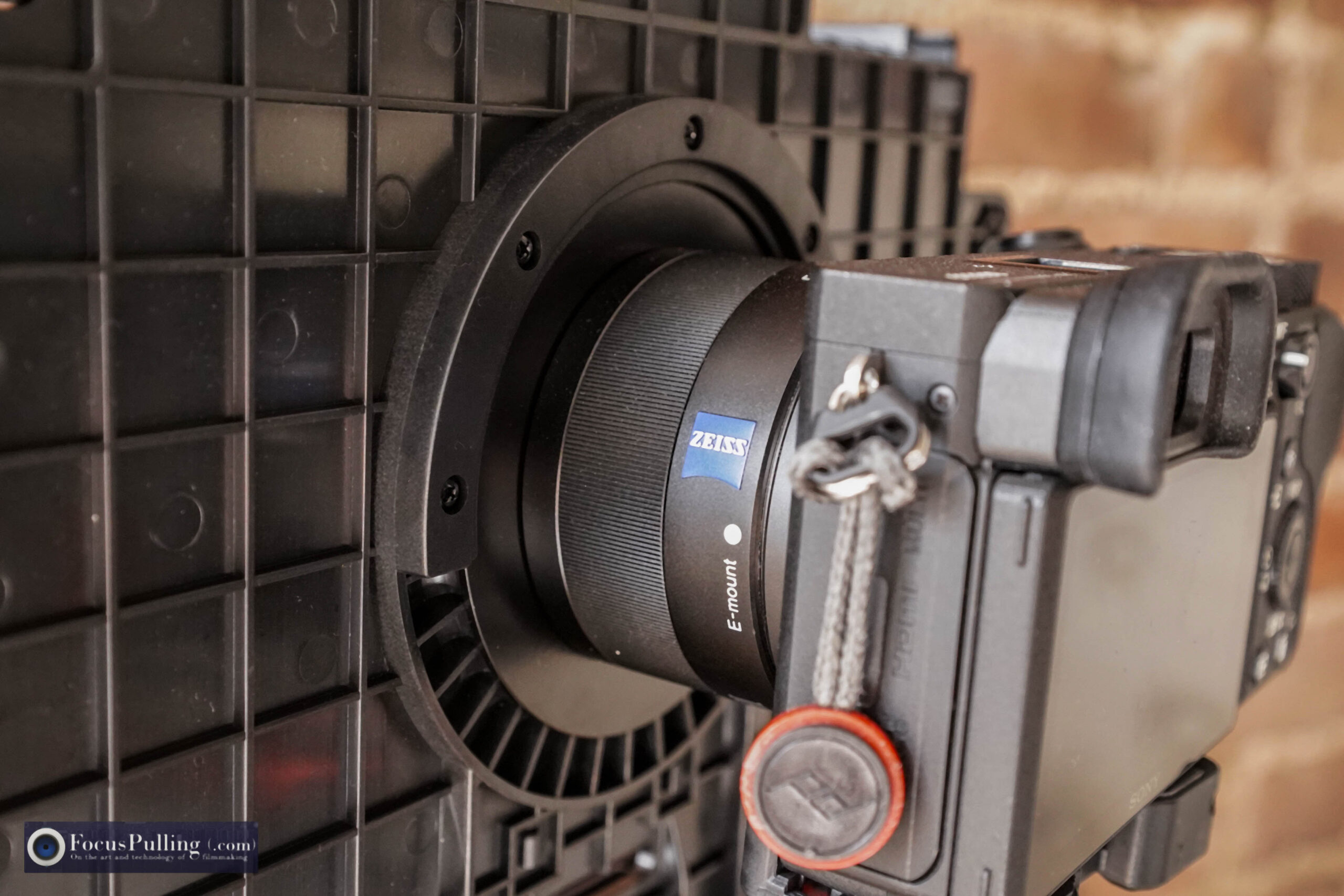
Narrowing down some more, if the whole rig can be lightweight anyway, there’s no point in having a complex rigging system with rails and brackets to mount everything onto your camera – so, you’ll want something that easily and quickly just hooks onto your camera lens. The Moman MT2, like many (but not all) others, includes adapter rings ranging from 49mm to 77mm to screw into those filter threads on the front of most lenses (though sadly, not at 82mm which I would have liked to use with my Tamron G2 lenses). Then, a bracket on the back of the teleprompter body just slides onto that adapter ring, and you need to rotate it until level. It doesn’t solidly lock into position, but this isn’t an industrial product either.

I’m pairing the MT2 with my basic Sony A6600 and Sony 35mm pancake Zeiss lens, which is a pretty good match: you’ll want a focal length that’s not too wide, not too long. But you’ll be able to make further adjustments. Using the tablet (and smartphone) tray sticking out the front, you’re able to adjust the height of the display surface pointing up, which in turn “zooms” in and out to fill the reflecting surface just right. That mechanism, however, is the biggest flaw of the MT2: the tray is secured by just a single thumbscrew, and the whole tablet/smartphone easily rotates out of position over the course of any session. Moman should have designed the holder with two mounting points so that it’s forced to stay parallel with the teleprompter.

The MT2 comes with free software for Android and iOS, and there are pros and cons to using it. On the plus side, you can use the Bluetooth-connected remote control for starting/stopping scrolling, and adjusting the speed. On the negative side, the software leaves a lot to be desired. It cannot import text from any file format – an incredible omission because it would have been such an easy feature to code. You need to cut and paste from the clipboard of your device, hopping between open apps. My chosen compromise is to use the free version of an alternative app called Elegant Teleprompter. Since it’s not natively compatible with the proprietary Bluetooth remote, I just pair it with a Bluetooth mini-keyboard and assign keys to the necessary functions.

But what really matters, of course, is the ultimate video quality. I was surprised to find it being hardly degraded, under the right lighting conditions. Sure, as with any bare lens in general, if there are angles of light pollution hitting the intermediate reflector in a wrong way, you can get glares/reflections. But in a studio setting where you’d almost always shoot teleprompted scenes, that’s always manageable (less so, outdoors).

Speaking of, if you’re really shooting on the cheap and want to use a smartphone camera as the actual filming device, there is an adjustable top mounting point, and side mounting point, for an included bracket that pairs with various foam mattes to get the smartphone camera lens sealed up to the rear hole for minimal light leaks/pollution.

The kit comes with a mini-tripod, and a nice big drawstring bag, boxed up for retail/shipment. All told, for under a hundred bucks, this does the trick. It’s not rocket science, and you won’t be – shouldn’t be, really – using this too often in your serious nonfiction work. And if you’re using this or anything like it for your scripted dramas – well, you might be in trouble.

October 15, 2021 FocusPulling Original Leave a Comment
16 September 2021

Norm Macdonald reads The Final Chapter from his memoir, reflecting back on his life

Written by Paul Moon

I’ll never forget sitting a few rows from Norm Macdonald, almost exactly five years ago on September 22, 2016 at Sixth & I in Washington, D.C., when he read from his memoir Based on a True Story. Now that we know he had cancer back then too, his reading of “The Final Chapter” might be the best way for us to understand what he went through, to celebrate his wit, melancholy, and kind heart.

He’s sitting next to journalist Geoff Edgers, who wrote the best-ever piece on Norm, then one more “final chapter” at The Washington Post.

Here, I’ve edited and upscaled from a low-resolution copy-of-a-copy-of-a-copy into 4K using Topaz Video Enhance AI (Artemis Medium Quality v13 from 720p to 2160p), then I color graded using FilmConvert (FJ SuperX 400 emulsion simulation with 35mm film grain), and cleaned up the audio using iZotope RX 8 Advanced (Vocal Noise Reduction and Loudness Control). There are no cuts or edits to his original reading, just me leveraging the 4K upscale to occasionally punch in for shot diversity. It felt important to get this right, and it’s shared here in a spirit of fair use and tribute, in memoriam.

September 16, 2021 FocusPulling Original, FocusPulling Original Video Leave a Comment
01 September 2021

Mirfak WE10 Pro Dual Wireless Microphone Kit Review

Written by Paul Moon

The field of ultra-portable wireless microphones has kept growing, after my review of Comica’s dual kit that was fresh at the time for including the quick option of built-in mics on the transmitter, or lavalier mics plugged into the transmitter for a better look.  That’s a legit use case, even for serious filmmakers, because you can complement a primary durable kit running on licensed frequencies, with these run-and-gun clip-ons that run on unlicensed 2.4 GHz, to catch a few more channels of properly mic’ed audio.  Instead of wiring up talent in that awkward and time-consuming routine, you’ve got the option for a tiny matchbox-sized clip-on or two, while you run around on location, grabbing footage and impromptu dialogue by asking, “Hey, can you clip this on real quick?”

After Comica and of course Rode at the top of the game, many more of these arrived to market, more or less the same.  What then was left to add as a feature?  Answer:  internal recording.  Mirfak is the audio brand of Gudsen MOZA, and their WE10 Pro is now available:  in fact, they’re offering FocusPulling readers (that’s you) a gigantic 40% discount at $100 off when you use the exclusive discount code GQAN7D2V at checkout, when you buy at Amazon using this link.  Or you can use the same code to get 40% off the 1-transmitter pack option at the same link.

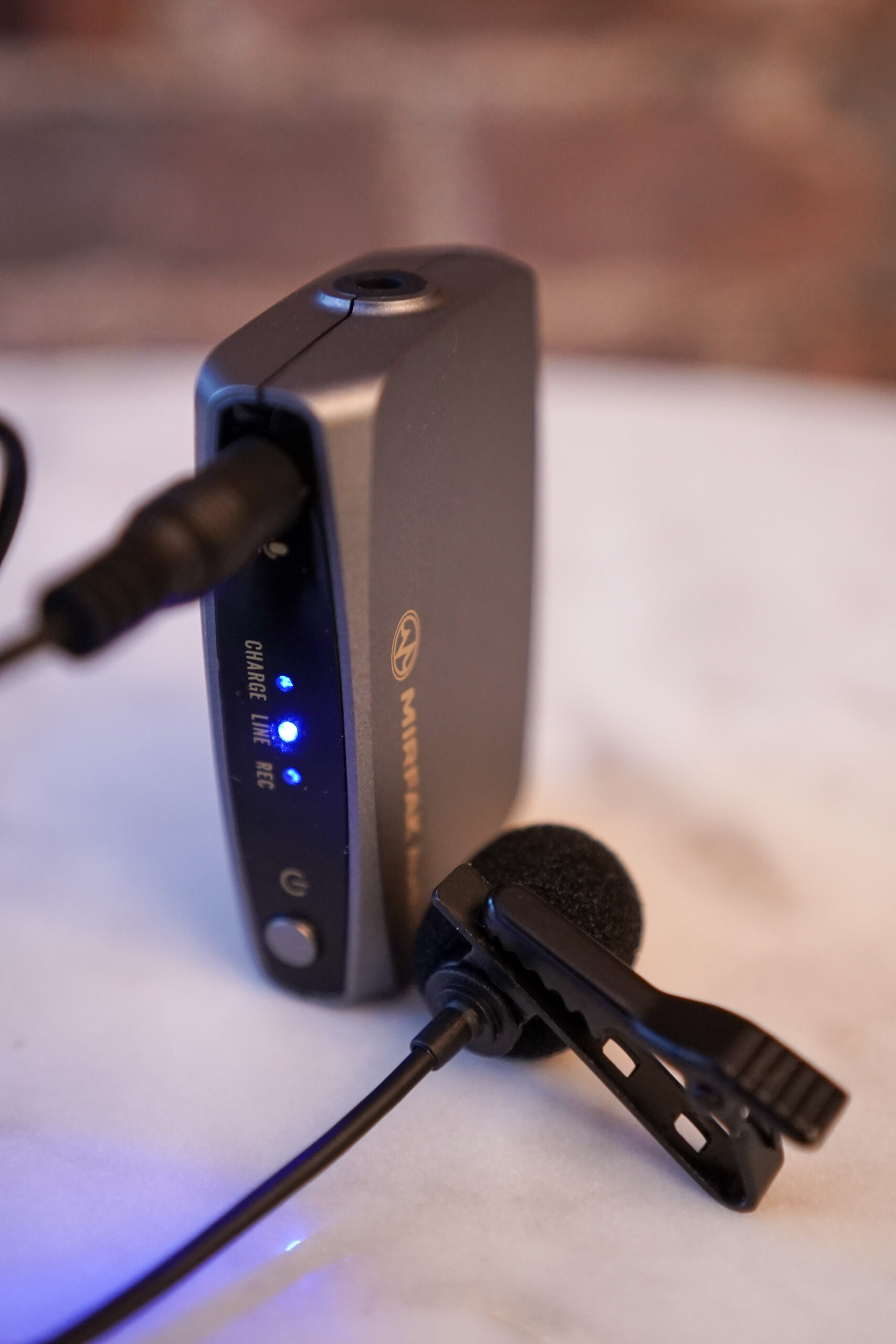
Most of this should look familiar, and needs no explanation.  But the distinguishing feature is internal recording, so let’s focus on that first.  Each transmitter has a slider (labeled 1 above) that can activate internal recording:  it starts once you move the slider there, otherwise it’s only feeding live sound to the receiver (but it does that simultaneously too when it’s recording internally).  Each transmitter has a MicroSD card slot, and you need to be careful finding the right card(s).  It cannot exceed 64gb, and some cards won’t work:  my Transcend Premium 400x 64gb UHS-I wasn’t recognized after properly formatted to exFAT rather than NTFS or HFS+, even though it works in drones and cameras.  Point being, they’re cheap anyway and you will find one that works, but make sure that you’re up and running before heading into the field.

But there’s something you need you know, and it’s a compromise:  Mirfak, to avoid adding a localized input gain control (compared to the receiver output gain control), sets the whole transmitter at a fixed volume level.  The above analysis shows me talking at normal conversational loudness, mixed with a few quiet moments, but then you can see clipping when I’m talking a bit loudly — not even yelling, but above normal.  So, even though it’s recording internally at a better (and more reliable) audio quality than wireless transmission, you need to be careful.  Sometimes, it just won’t work.  When I record stand-up comedy, I can quickly throw a WE10 transmitter on talent, farther away from their mouth to be safe, but when the whole room laughs, that cumulative loud noise clips.  You might be confused by the gain control on the receiver unit — I was, at first — because it does let you toggle between -18 dB, -6 dB, 0 db, and +6 db.  But that is only adjusting the output preamp to your camera/external recorder.  As you toggle between the gain settings, you’ll notice that the meter isn’t affected, and it bounces up to the same level with each changed setting.  So if there is clipping before any sound arrives to the receiver, you’re in trouble.

Another issue:  the audio files, while stored in WAV format at a fairly low 177 kbps bitrate, are oddly fixed at a 44.1 kHz sampling rate, which takes us back to the good ole days of spinning compact discs.  (The bitrate on 16-bit stereo audio CDs is generally 1,411 kbps.)  The entire universe of video production is, of course, 48 kHz, so if you’ve got an hour of internally recorded audio that you need to sync with video, there will be some drift.  However, you can always time-stretch fairly easily, and when using format-agnostic NLEs like Adobe Premiere Pro, the program interpolates behind the scenes so that you mostly don’t need to worry about this unfortunate anomaly on shorter clips.  In sum, the sampling rate problem isn’t a big one for me.

Another selling point of the WE10 Pro kit is of course that you can record from two transmitters at once, through one receiver, into your camera with live sound.  And here, there’s something else you need to know:  unlike most other competing products, this one cannot allocate one transmitter to the left channel, and one to the right channel, with independent gain control and/or (most importantly) the ability to separate them out during post-production.  That might be a deal-breaker for you; for me, it’s a minor frustration, and another compromise:  it keeps things simpler, meantime for best results I’m always recording internally anyway, and syncing each transmitter’s separate recorded audio in post, able to control each channel independently that way.  And that’s the whole point of internal recording:  an insurance policy against no wireless dropouts, with theoretically better sound quality, and peace of mind.  I still record the mono-summed audio into one of my camera locations for an ironic backup of the internal recordings, as well as for syncing in post.  But I also envision situations when recording internally at the transmitters, and leaving the receiver off entirely, makes sense:  for example, when I’m flying on a gimbal, not having a receiver in the mix really simplifies balancing and re-balancing.

Transmitter recording
Transmitter status
Receiver controls
Receiver ports
Transmitter with lav

Some highlights of its basic features:  I like that the charging ports are USB-C instead of outdated micro-USB — and as you can see below, Mirfak includes an octopus of three plugs so that you can charge everything at once from one standard USB Type A connector.  Mirfak also includes a drawstring pouch that holds everything, as seen below too.  For that matter, you also get a coiled 1/8-inch stereo miniplug cable, with the same for smartphones using TRRS (“tip-ring-ring-sleeve” stripes on the connector).  Lavalier microphones with clips, windscreens, and cables are included for the transmitters, and the sound quality is mediocre:  if you have a spare one from a better kit, it will probably be compatible with the industry’s notoriously vague “plug-in power” to drive the condenser microphone.  I’d even dare say that the internal microphones sound a little better than the included lavaliers, but there are more factors to consider, like aesthetics (hiding the mic in your shots), and isolation from rumbling/bumps that tends to go better with lavs than with clip-on packs.

In my last picture from the row above, besides the gain toggle, you’ll also see (on the receiver) a mute button, and a highpass filter toggle that cycles between off, and two cutoff frequencies: 170 Hz, and 230 Hz.  Basically, you choose these to avoid low-frequency rumble caused by street noises, wind, HVAC, etc.  But I always save that decision for post-production anyway:  I’d rather make that choice non-destructively, when I have the time and quiet environment to get it right.  So it’s always off (0 Hz) for me, and you can see it confirmed on the receiver’s OLED screen.

In sum, this is the only ultra-portable and cheap wireless mic kit that comes with everything:  two transmitters into one receiver, lavalier mics for when you want/need them, internal recording capability, and cables/windscreens (dead cat as well as spongy)/storage pouch.  At $250, it’s a nice option to have; but with the exclusive discount code offered by Mirfak here (see above), it’s a real bargain option to have handy at all times for running and gunning.

September 1, 2021 FocusPulling Original Leave a Comment
← Older posts
Newer posts →

Recent Posts

  • PGYTECH OneGo 2 Backpack Review
  • DJI Osmo 360 | touring Washington DC
  • PGYTECH OneMo 2: this might be your ultimate backpack
  • DJI RS 3: Essential accessories for the best all-around gimbal stabilizer
15,288Fans
2,939Followers
51Followers
333Followers
6,170Subscribers
588Followers
54Subscribers
722Subscribers

Subscribe to Receive New Posts (Low-Traffic)

Check your inbox or spam folder to confirm your subscription.

START HERE TO GET YOUR GEAR AT THE B&H STORE

B&H Search Banner Small
B&H Photo - Video - Pro Audio

Advertisement
  • RECENT REVIEWS AT FOCUSPULLING

The Latest from Your RigShots

Follow FocusPulling (.com)'s board RigShots on Pinterest.
© Copyright 2015 by Zen Violence Films LLC, all rights reserved. To read the site privacy policy and ethics statement, click here.