• Blog
    • Latest Posts
    • News
    • Featured Videos
    • Deals
  • About
  • Camera User Groups
    • ARRI
      • User Videos
      • News & Deals
      • Related Posts
    • Blackmagic
      • User Videos
      • News & Deals
      • Related Posts
    • Canon
      • Canon Cinema EOS
        • User Videos
        • News & Deals
        • Related Posts
      • Canon 5D Mark III/IV
        • User Videos
        • News & Deals
        • Related Posts
      • Canon Rebel/70D/80D
        • User Videos
        • News & Deals
        • Related Posts
    • Panasonic
      • Panasonic GH5
        • User Videos
        • News & Deals
        • Related Posts
      • Panasonic GH4
        • User Videos
        • News & Deals
        • Related Posts
      • Panasonic GH3
        • User Videos
        • News & Deals
        • Related Posts
    • Sony
      • Sony a7-Series
        • User Videos
        • News & Deals
        • Related Posts
      • Sony CineAlta
        • User Videos
        • News & Deals
        • Related Posts
      • Sony PXW-FS7
        • User Videos
        • News & Deals
        • Related Posts
      • Sony PXW-FS5
        • User Videos
        • News & Deals
        • Related Posts
      • Sony NEX-FS700
        • User Videos
        • News & Deals
        • Related Posts
      • Sony NEX-FS100
        • User Videos
        • News & Deals
        • Related Posts
      • Sony NEX-VG10/20/30
        • User Videos
        • News & Deals
        • Related Posts
    • Z CAM
      • User Videos
      • News & Deals
      • Related Posts
    • RigShots
  • VR
    • Daily Digest
    • Videos IN VR
    • Videos ON VR
    • Latest Posts
    • News & Deals
  • DOCOFILM
    • Newsletter
    • Latest News
    • Featured Videos
  • Essays on Film
  • Adobe Premiere Tips
Menu
  • Blog
    • Latest Posts
    • News
    • Featured Videos
    • Deals
  • About
  • Camera User Groups
    • ARRI
      • User Videos
      • News & Deals
      • Related Posts
    • Blackmagic
      • User Videos
      • News & Deals
      • Related Posts
    • Canon
      • Canon Cinema EOS
        • User Videos
        • News & Deals
        • Related Posts
      • Canon 5D Mark III/IV
        • User Videos
        • News & Deals
        • Related Posts
      • Canon Rebel/70D/80D
        • User Videos
        • News & Deals
        • Related Posts
    • Panasonic
      • Panasonic GH5
        • User Videos
        • News & Deals
        • Related Posts
      • Panasonic GH4
        • User Videos
        • News & Deals
        • Related Posts
      • Panasonic GH3
        • User Videos
        • News & Deals
        • Related Posts
    • Sony
      • Sony a7-Series
        • User Videos
        • News & Deals
        • Related Posts
      • Sony CineAlta
        • User Videos
        • News & Deals
        • Related Posts
      • Sony PXW-FS7
        • User Videos
        • News & Deals
        • Related Posts
      • Sony PXW-FS5
        • User Videos
        • News & Deals
        • Related Posts
      • Sony NEX-FS700
        • User Videos
        • News & Deals
        • Related Posts
      • Sony NEX-FS100
        • User Videos
        • News & Deals
        • Related Posts
      • Sony NEX-VG10/20/30
        • User Videos
        • News & Deals
        • Related Posts
    • Z CAM
      • User Videos
      • News & Deals
      • Related Posts
    • RigShots
  • VR
    • Daily Digest
    • Videos IN VR
    • Videos ON VR
    • Latest Posts
    • News & Deals
  • DOCOFILM
    • Newsletter
    • Latest News
    • Featured Videos
  • Essays on Film
  • Adobe Premiere Tips

Category: FocusPulling Original

30 April 2018

Review of Aputure Amaran MX Portable LED Light

Written by Paul Moon

Aputure is finally (slowly and belatedly) delivering their Amaran MX portable LED light, following up their innovative ultra-compact Amaran M9 that costs $45. At more than triple the price, is this new MX worth it?

Well, it arguably out-performs the M9 by at least a factor of three, so that’s something. But Aputure seems to be fast forgetting its modest roots as a budget alternative to Litepanels and the like — I’m sure it costs a lot to pay poster child Ted Sims‘ salary, and send him on a non-stop global evangelism tour — so now, it’s sad that they’re losing focus on the survival principle to tag what it really costs to make these things, even after a healthy profit margin. And anyway, they blew their manufactured hype by making everyone wait almost a full year since announcing the product mid-2017.

But here’s the run-down, before diving into the technical details:

  • Internal lithium battery, not removable: a good thing
  • USB-C power: because Micro-USB is dead
  • Solid construction: but did that heat sink need to be so thick and heavy?
  • Diffusion: frosted plastic plus flexible gel are a great combination
  • Interface: solid, logical, and easy to use
  • Price: way too high, but there’s no competition (yet)
Opinions will vary, but I really like the way that there’s no external battery mount on this thing. It would have made the total form factor much bigger, while also, USB-driven external power as a supplement is extremely ubiquitous these days: we all stash a USB battery pack and charger with our gear anyway, and that’s the trend we’re seeing in, for example, the Sony a7 series cameras — the option for USB power, both for charging and for an active power bus. Then, I’m glad that Aputure went with the USB-C port standard, which is much more durable, with less fiddling at insertion because there’s no directionality to the plug (up vs. down).

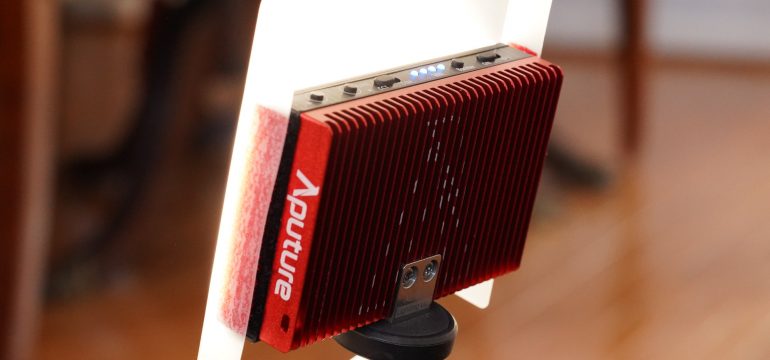
Compared to its plastic M9 predecessor, the metal MX is substantially heavier owing mostly to a thick and heavy red heat sink on the back, seen in the picture at right. After leaving the light on at full brightness, I didn’t sense that it was fully necessary, but here you could give Aputure’s engineers the benefit of the doubt. Yet it certainly more than doubles the weight and size of the thing, so I hope it’s worth it.

I love the textured black metal surface, the solid tactile button controls, and the intuitive layout. As seen in the below pictures, the up/down buttons on the left control either color temperature, or brightness, depending on the mode selected by the switch just to their right. There are only five gradations/steps in either category, however, so this is not a device you can finely tune (and you definitely can’t make adjustments during a rolling shot, like you could on a light with continuously adjustable knobs).

Also, this is a typical LED matrix with light elements that have fixed indoor color temperature, interspersed with light elements that have fixed outdoor color temperature, as seen at right — and all you’re doing is adjusting the relative brightness of each category. Thus you actually achieve maximum brightness during a blend of indoor and outdoor LED elements, at the halfway point — though in real-world use, given the realities of complicated shooting environments that usually reflect and create blended color temperatures, you’ll usually find yourself firing in that brighter middle zone anyway.

Speaking of brighter, there’s that exciting-looking button labeled Booster: it gives you a temporary, one-minute burst of around 30% more overall brightness. Oddly and counter-intuitively, it also only works from battery power: if you’re getting strong USB bus power, no dice. I doubt I’ll ever use the mode anyway, failing to remember when setup and shooting ever lasted less than a minute; but perhaps for quick clips of objects and retail products in close-up, etc., it’s nice to know it’s there.

In the above pictures, you can see the whole face of the light without any diffusion, which of course will look harsh when it’s on (my a7 III camera can’t really capture those lights separately firing), while Aputure also provides a magnetically attached hard frosted plastic diffusion panel. Unfortunately, it shifts around in place pretty easily, and it should have been designed to notch into position, though Aputure includes an extra one just in case.

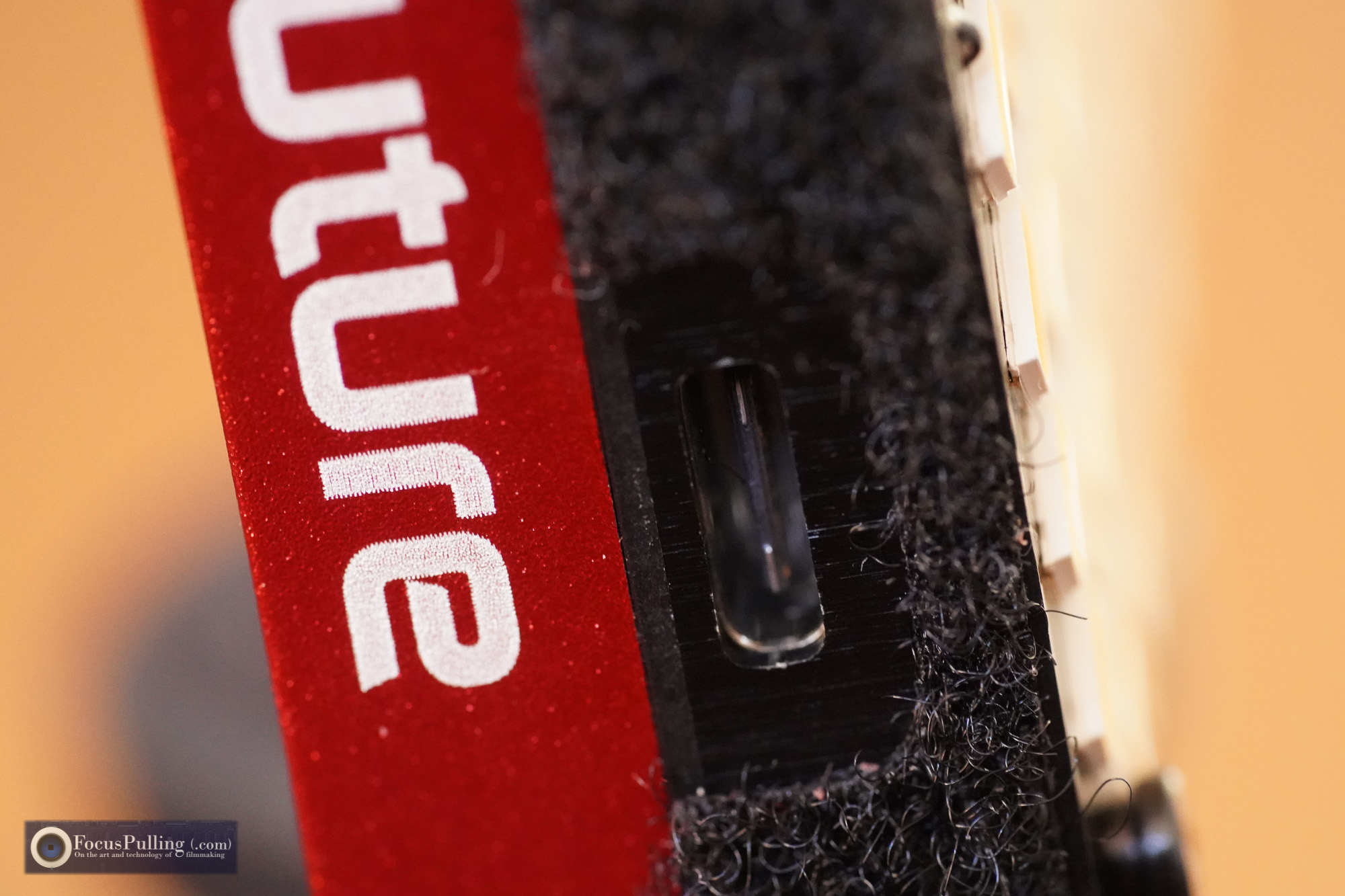
But what I really valued most was the combination of the hard panel, and the gel that they include, pictured at left, attached with velcro. True, the total light output decreases a little, but given that warped separation you see from the surface, and an additional layer of diffusion, the final result is really pleasing and still quite a bright source for soft lighting. I can see it serving as a portable fill light for interviews, supplementing of course a bigger, primary key light. And you can easily mount it to numerous camera accessories (e.g., mini tripods, mini light stands, etc.) using its standard 1/4″-20 socket that’s really well reinforced at bottom.


Complementing the sturdy chassis of the MX, Aputure includes an extremely well made zipper pouch, seen above. At first it looks oversized for the small wonder of the MX alone, then you realize that to carry the diffusion gel without damaging it, you need a large enough pocket to avoid folding it. Then, there’s also plenty of room for the included USB-C to standard USB cable, and a couple of branded rubber bands that are just sort of thrown in for no likely field use I can think of. There’s also room for the pictured ball mount with hot shoe adapter. Although no one seems to have actually reviewed the MX as of this writing (besides trade show tinkering), I’ve noticed advance plaudits about the ball mount, even though really it’s nothing special. I’ve seen worse, but I’ve usually seen better.

Should you get this thing? Well, at $150, it’s overpriced — sort of a luxury item. It reminds me of the main reason the Sony RX0 matters/mattered: “The best camera [or light] you have, is the one you have with you.” And even if you’re normally kitted out with a suitcase full of lighting gear, life doesn’t always make that possible. I love having an option to run and gun with this kind of little light. I owned the Aputure Amaran M9 before this, and I keep stashing an Ikan iLED-ONE as a tiny little kicker and rim light, for backup. Until something else comes along, this Aputure Amaran MX is getting a permanent spot in my camera bag and I trust it’ll get me out of some unexpected situations, with passable light — after all, when shooting with large-sensor digital cameras these days that increasingly suck up light at historically stunning sensitivity, something like this can really do the job.

April 30, 2018 FocusPulling Original 2 Comments
09 April 2018

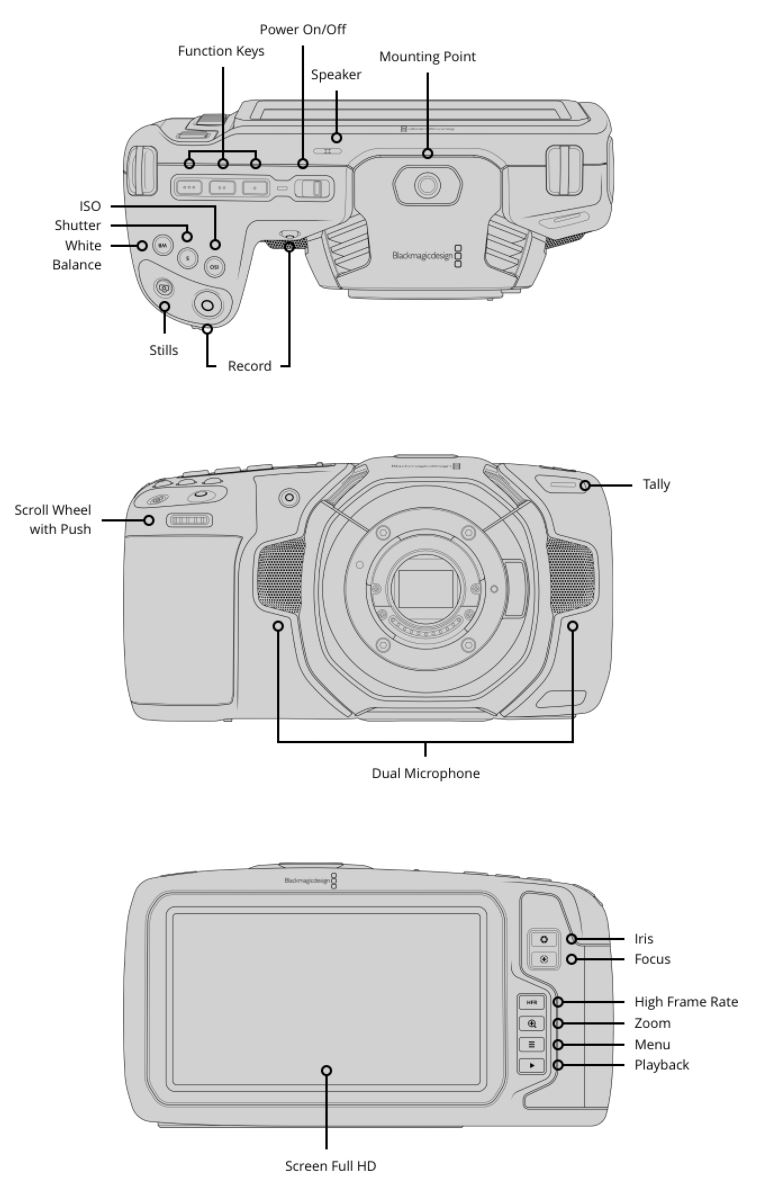
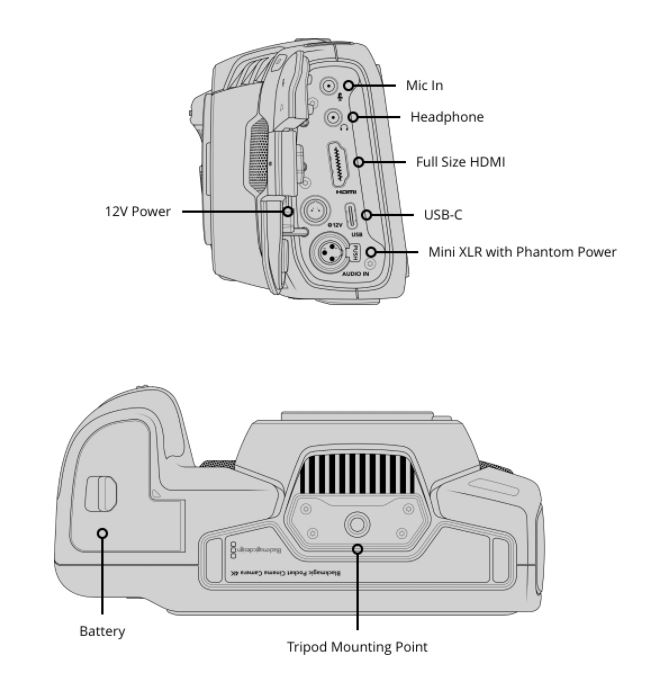
Blackmagic Pocket Cinema Camera 4K is here!

Written by Paul Moon

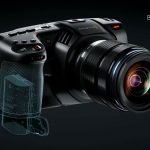
Blackmagic Design has just announced their Pocket Cinema Camera 4K at the NAB show, and pre-orders to get early in line for planned September delivery are already being taken at this link (and for those in Europe, also here). They did a great job building suspense, with a huge banner outside the convention center. Some leaked photos added little to the launch, as usual, with misleading speculation about a 16mm sensor size, flip-out screen, and even IBIS!

One of the great virtues of the original Blackmagic Pocket Cinema Camera was its stripped-down nature, offering just the most fundamental settings that any budding (and experienced) cinematographer needs to know. And as one of the first early adopters to shoot something cinematic with it, I really cut my teeth with this test run, shot over a weekend in New York City:


Shooting “First Day Out” using BMPCC (dir. Josephine Decker, 2016)

As my associated commentary on the video explained, there were big issues to work around — mainly, battery life and ergonomics/menus — but the payoff far outweighed those hassles. The Blackmagic Pocket Cinema Camera delivered compelling 1080p video in log format with excellent highlight roll-off, film-like grain, 10-bit 4:2:2, and a “vintage” look from its 16mm sensor (the same aesthetic accorded by the now-defunct Digital Bolex). After starting the biggest User Group dedicated to Blackmagic Design (combined with Facebook and Twitter) built primarily on user-submitted content, it became clear that the original Pocket was a sort of democratization tool, putting cinematic videomaking into the hands of more creatives than ever. It definitely kickstarted my career.

That makes the arrival of the Pocket’s successor a bit anxious. If one thing has changed since the launch of the original Pocket, it’s that mirrorless cams have gotten even more feature-packed — while even so, what never changed is the split-identity crisis between still cameras and cinema cameras. Aliasing was the biggest Achille’s heel of hybrid cameras, but then, enlarged photosites and optimized pixel binning have minimized what used to seem like an impossible technical compromise. Menus on the Sony Alpha and Panasonic Lumix cameras, for example, continue to be a swirl of endless features that mix still photography with optional video features that aren’t really in a professional cinematographers’ wheel house (e.g., auto-focus). Thus it always felt like the future would bring us an amicable divorce between digital still photography, and cinematography.

So the first concerning feature of the new Pocket 4K is the addition of still photography into the mix. Lots of us would rather not have it; and the sensor size doesn’t accommodate sufficient megapixels for the camera to become a serious candidate for stills.

But that would be nitpicking, if the stills feature doesn’t really compromise the video features. On the early side, I’ll get my hands on this to make sure, but let’s focus only on video. First, it’s useful to consider what everybody else is doing wrong — especially the market leader, Sony.

Yesterday, Sony “re-launched” their PXW-FS5 with a Mark II model that added one of the least relevant features for serious creatives: high frame rates (and even so, that’s only after hooking in a “compatible” external recorder for the marquee feature — nearly mooting it). But worse, it failed to include what I think we should all agree by now is the baseline minimum for acceptable cinematography: 10-bit 4:2:2 capture. Panasonic has laudably packed that into the small GH5 body, and there’s no option anymore to leave it out in this market. Sony didn’t launch the a7S III at NAB, but whenever they do: if it’s mainly just a bump up to 4K/UHD at 60fps, it’s another non-event from Sony. And what all these cameras have in common is a relatively lossy internal recording codec, in every case a derivative of H.264 compression. It’s simply not ideal.

But back to Blackmagic. This is where the new Pocket 4K continues the tradition of its predecessor: 10-bit 4:2:2 at high bitrates into a robust recording codec. ProRes remains a proprietary (and protectionist) industry standard by Apple, that I have always estimated — and still do believe — is on its way out. ProRes RAW had promised to breathe new life, but it’s missing on the new Pocket 4K. (Bitter rival Atomos might have eclipsed that possibility, given secret industry boardroom hijinx, but who knows.) Regardless, for a better alternative, the new Pocket 4K also offers 12-bit true CinemaDNG 4K RAW capture — and to make that feasible, the high-speed USB-C port can connect to an external SSD for longer recording times in RAW.

As to high frame rates, even 60fps at UHD/4K still lacks priority in this overall context (along with the capability to crop in, for lower-resolution 120fps capture). Other, larger cameras can be leveraged for those very rare (please!) occasions when slow-motion can be creatively justified. I hope that the strangely persistent customer demand for high frame rates (wedding videographers?) didn’t cripple other features that could have emerged in the Pocket 4K — and in cameras across the market, generally. Again, to mention the FS5 II: Sony exploited a tiny tweak in high frame rate capability for justifying a whole new product launch (which is an accounting department con to increase profits), which was, in reality, just a firmware update to the original FS5. (Does anyone even look at this kind of behavior from an environmental perspective, as it adds more metal/plastic to Earth’s landfills with no real reason?)

But on to some positive things: the lens mount staying Micro Four Thirds was sort of pre-ordained, but it’s nice to see it again (especially after lens investments for the predecessor, and those of us who dallied with Lumix cameras when they were hot). Mounting those rarer lenses that actually include Power O.I.S. will be all the more critical, since the new Pocket 4K lacks in-body image stabilization. The full HD monitor on the rear will make those days of squinting at the old Pocket, seem comical — I hope the “nits” of lux are loud. How the internal audio pre-amps perform remains to be seen, but the stereo/dual microphones on either side of the lens (assuming the lens motors are quiet!) seem promising, while having a mini-XLR input with phantom power literally shames every other portable camera on the market today. Using the ultra-ubiquitous battery that’s used on Canon DSLRs, too, will open up cheap and longer-lasting power, paired with the further option of external 12V all-day hookup. (Meantime, Sony lawyers bully the third-party market against emulating their overpriced yet much-hyped NP-FZ100 for newest Alpha cameras). And best of all, the sensor: though we’ll lose that forced vintage look, and wide depth of field, from the former 16mm sensor, going to Micro Four Thirds was all but certain — not only for better light-gathering, but also to evade that prior 3x crop factor (and there’s only so much room to cram in pixels for 4K video).

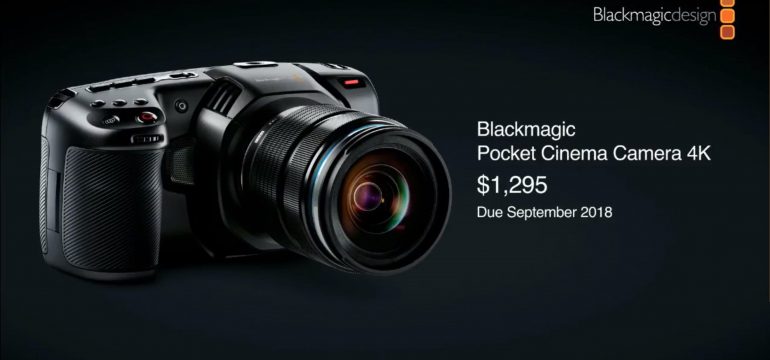
The price at $1,295 retains the democratizing and generous spirit of the original HD camera, and the estimated September 2018 delivery might need to be taken with a grain of salt given Blackmagic’s history — but they’ve improved on manufacturing, and I know they’ll deliver. This is a really exciting new product, exceeding nearly every expectation. I love this company. The Aussies are killing it.

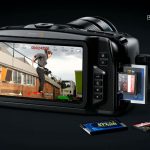
Here’s a gallery of photos from the NAB presentation:

What do you think? Looking forward to your comments here and on Facebook/Twitter. You can see the entire product page at Blackmagic Design’s website, and as mentioned earlier, pre-orders are already being taken at this link (also here in Europe) for planned delivery in September.

April 9, 2018 Blackmagic Cinema Cameras, FocusPulling Original 5 Comments
06 April 2018

Adobe Premiere Pro April 2018 Update: 2x faster export!

Written by Paul Moon
SUMMARY: If your Intel CPU supports Quick Sync, and if your motherboard lets you boot into running internal graphics simultaneous with your dedicated GPU, then your encoding times for H.264 & H.265 files should go dramatically faster.

Anyone who uses Creative Cloud software has got either a love/hate relationship with Adobe, or doesn’t know any better. Premiere keeps bloating like a bad all-you-can-eat buffet, even as it leaves unforgivable major bugs alone for months and sometimes even years. Their Q1’2018 profits are rocketing out of orbit, just as they’ll be jacking up your subscription cost this month. Every year when the NAB Show rolls in, Adobe rushes to market a new line-up of added features, mostly fashionable things that drive fringe industries and deployments like VR. They do boast each time about bug fixes, which is actually a way to see Adobe finally admit publicly that the program’s basic features are a mess. Some highlights in their latest April 2018 fix list include “Crash when playing some files at 1/2 resolution,” “All frames are dropped on playback of an HEVC clip when playback is set to less than Full resolution,” etc. That’s not to mention Lumetri being the #1 reason for failed exports. And then, at this link, they admit to some current major, unfixed bugs: and that’s just from day one, before hundreds more will accumulate until the next update. All this adds new meaning to the term “upgrade,” which really amounts to “degradation” in Adobeland.

But amid that usual madness, Adobe introduced two stunning features this week. One of them has been reported endlessly, like a reprinted press release: a new comparison view in the Program Monitor, combined with “Sensei”-driven automated color matching between shots. It’s really incredible for color grading and it’s long-overdue. But what absolutely no one has written about, is a short blurb way down their list, that’s actually the most important productivity boost they’ve added in years.

Intel Hardware Acceleration of H.264 & HEVC Encoding

When you click this link, you’ll see a table at Intel’s website of every CPU that supports a technology called Quick Sync. If your Windows or Mac computer has one of those listed CPUs installed, the next thing to check is whether your motherboard allows you to simultaneously enable the internal Intel graphics driver, and any dedicated GPU (such as GeForce or Radeon). By default, the BIOS of most motherboards (a configuration screen you can access before booting into the OS) sets internal graphics to “Auto,” which actually means that if you have a dedicated GPU installed, Intel UHD/HD Graphics gets disabled. Some (but not all) motherboards allow you to force-enable internal graphics, and then it’s possible — though not guaranteed — you can boot into the OS with both internal and dedicated graphics acceleration active at the same time.

Of course, Adobe explains none of this, anywhere, underestimating how their new feature won’t be available to the vast majority of users without some “hacking” as described here. (Probably, true to lazy form, Adobe just doesn’t want to deal with anything remotely related to hardware — as if you can separate hardware from software development.) Same for the new and crowded majority of Adobe-lobbied “filmmaking” (i.e., wedding videography) bloggers writing about this release, too.

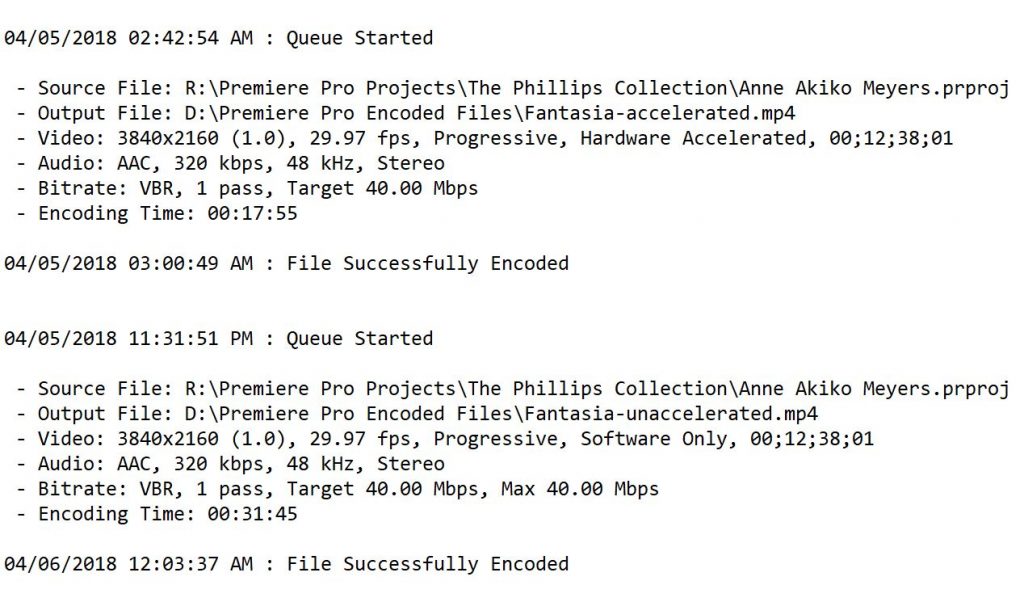
In the above screen capture, you can see how it looks, whenever a CPU’s internal graphics with Quick Sync actually works; yet in most cases, you’ll get “Software Only” in the new Encoding Settings/Performance field (“Hardware Accelerated” grayed out) if you have a dedicated GPU like most people.

But let’s say you do get the killer combo of a supported CPU, and simultaneous internal and external graphics enabled into a full OS boot. Great! Let’s see how much better it performs, both from a direct export within the Adobe Premiere application, and equally when that export runs through Adobe Media Encoder.


Here’s my case study. The above video represents a fairly intensive amount of churning at export. There are three camera angles using very different codecs, from a Sony a7S II’s UHD XAVC-S to a Panasonic GH4’s UHD AVC to a Blackmagic Pocket Cinema Camera’s HD 10-bit ProRes 4:2:2. All of them are graded with Lumetri in combination with FilmConvert, outputting to UHD. So, this is reasonably heavy lifting.

The system I built has a Core i7-6700K CPU (that supports Quick Sync, per the reference table, using Intel HD Graphics 530) supported by 32gb of DRAM on a Gigabyte Z170X motherboard that allows me to force-enable internal graphics even while I am running a Nvidia GeForce GTX 1060 6gb graphics card.  In effect (and this is ironic, given the current retail crisis in the GPU industry), it’s like the internal graphics is only data mining for the “cryptocurrency” of H.264 acceleration, without even being connected to and driving a monitor.


From the above results, you can see that the hardware accelerated export of the exact same content went about twice as fast. Let’s look at another test.


With the same multi-camera configuration and effects as the last one, here I’m getting slightly less of a difference in export speeds, but that’s explained by the much shorter running time. I note that this pair of exports drew from camera sources on a regular hard drive, rather than an SSD in the prior example, just to add variety.


Clearly, these examples portend a huge acceleration of our exports, to the most common codec in the universe. Seriously, it’s the rare exception that we export to anything but H.264. One theoretical boogeyman worth mentioning, that has always hung over hardware-accelerated exports, is that they can allegedly do a barely perceptible worse job (e.g., digital noise artifacts) in comparison to the lighter lifting of the Mercury Playback Engine alone; meantime you’ll occasionally find the errant random report that software rendering actually looks worse. I score it all as needless pixel-peeping, in comparison to the extraordinary benefits of faster exports. So far, I’ve never seen any visual flaw attributable to a hardware-accelerated render.

Encoding vs. Decoding: there’s a big difference (of course)

But hold on: haven’t we seen Intel acceleration before? Take a look at the below section in Preferences — look familiar?

That checkbox pointed to in red, has been there for a few years. But the key distinction is decoding, as compared to this new encoding feature. It’s a great example of Adobe botching another feature, for years, and never explaining it well. Besides always leaving the h in H.264 lower-case, Adobe never addressed whether this feature requires Intel internal graphics being enabled simultaneously with a discrete GPU — and they let the checkbox be enabled no matter what (rather than grayed out, as for encoding). What’s more, it’s been widely reported, by an evident majority, that the feature actually offers no recognizable benefit, while it’s also often sleuthed out to be the culprit for failed/crashed exports. All told, we shouldn’t confuse these features — and, the only one that makes a real difference is the newer Intel encoding hardware acceleration added this week. For once, Adobe really did something (and fingers crossed that it holds up).

If you have any questions about how to configure your computer for this new acceleration feature, let me know in the comments with a system description, and I’ll do my best to help.

April 6, 2018 FocusPulling Original Adobe, Adobe Premiere Pro, CC 2018, H.264, H.265, hardware acceleration, HEVC, Intel, Premiere Pro, Quick Sync 31 Comments
← Older posts
Newer posts →

Recent Posts

  • PGYTECH OneGo 2 Backpack Review
  • DJI Osmo 360 | touring Washington DC
  • PGYTECH OneMo 2: this might be your ultimate backpack
  • DJI RS 3: Essential accessories for the best all-around gimbal stabilizer
15,288Fans
2,939Followers
51Followers
333Followers
6,170Subscribers
588Followers
54Subscribers
722Subscribers

Subscribe to Receive New Posts (Low-Traffic)

Check your inbox or spam folder to confirm your subscription.

START HERE TO GET YOUR GEAR AT THE B&H STORE

B&H Search Banner Small
B&H Photo - Video - Pro Audio

Advertisement
  • RECENT REVIEWS AT FOCUSPULLING

The Latest from Your RigShots

Follow FocusPulling (.com)'s board RigShots on Pinterest.
© Copyright 2015 by Zen Violence Films LLC, all rights reserved. To read the site privacy policy and ethics statement, click here.